Papio-software › Papio-Office
Papio-Office - Stylos, word processor Papio-Office - Sigma, spreadsheet Papio-Office - Diapos, presentations Papio-Office - NoPaper, paperless document manager Papio-Office - IPP-PrintScan, driverless printing and scanning Papio-Office - Cardex, card file
Suite

Papio-Office

Version 3.0

The whole office suite in one archive: Stylos (word processor), Sigma (spreadsheet), Diapos (presentations), IPP-PrintScan (driverless printing and scanning), NoPaper (scanning and document management) and Cardex (card file). A launcher finds the programs beside it and opens the one you pick on the screen you pick — with two screens it places them left and right. What the programs share — the fonts, Ghostscript 10.07 native PPC for printing and the print preview, the text recognition engine — now sits once in a Shared drawer instead of being copied into each program. Unpack it anywhere, an SD card included: nothing is written outside the drawer, no program touches ENVARC: or your system preferences, and uninstalling means deleting the drawer.

Demo versions — every program can be tried; saving your work needs a registration, as do printing and saving a scan. All six: 89.90 €, future updates included. IPP-PrintScan is free with the purchase of any program of the suite; Cardex is free for those already registered for the whole suite. Already registered? The rest of the suite costs 89.90 € minus the list price of the programs you already have, and IPP-Print and IPP-Scan registrations work as they are with IPP-PrintScan. Contact me to receive your registered version.
  • Six native programs in one archive: Stylos, Sigma, Diapos, IPP-PrintScan, NoPaper and Cardex
  • A launcher that finds the programs beside it and opens the one you pick on the screen you pick; with two screens, one left and one right
  • Fonts, Ghostscript 10.07 native PPC and the OCR engine shared once in a Shared drawer, instead of a copy inside each program
  • Nothing written outside the drawer: ENVARC: and your system preferences are left alone, and uninstalling means deleting the drawer
  • Unpacks wherever you like, an SD card included; requires MorphOS 3.20+
  • One registration for the six, free updates included; IPP-Print and IPP-Scan registrations already work with IPP-PrintScan
  • One question at the first start: keep the manuals and catalogs of your language alone, and the other fourteen go — and stay gone, update after update
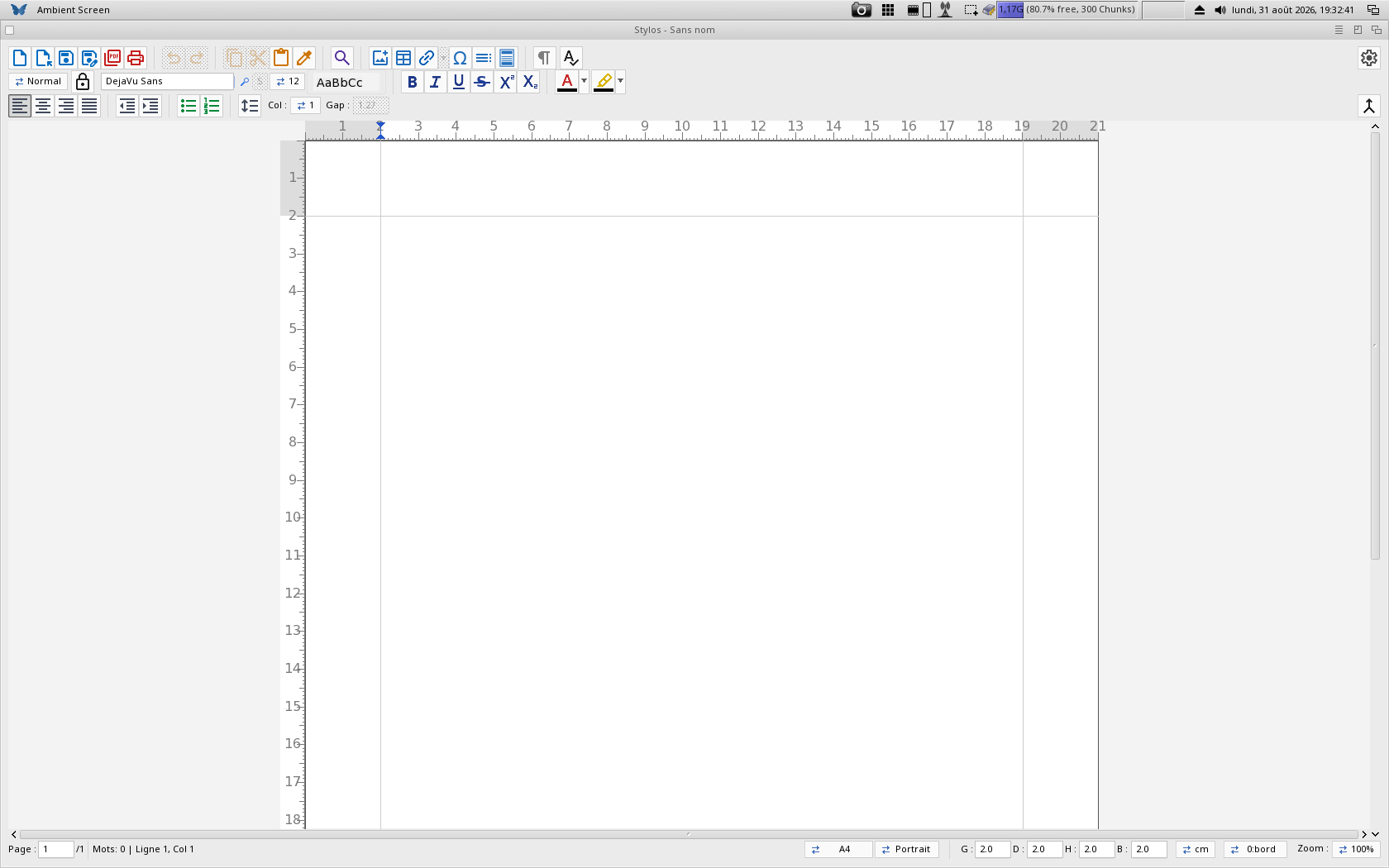
Stylos - Word Processor
Office

Stylos #

Version 4.8

A full-featured WYSIWYG word processor built natively for MorphOS. Stylos lets you create professional documents with complete UTF-8 Unicode support, advanced text formatting including hyperlinks, superscript/subscript, and high-quality TrueType font rendering via TTEngine. Stylos now does mail merge from a CSV, ODS or XLSX table — one copy per record, keeping the template's layout, styles, images and tables — and writes OpenDocument (ODT) as well as reading it, alongside footnotes and endnotes with automatic renumbering and ODT/DOCX import that brings in page setup, headers/footers and notes — on top of a tabbed print dialog with live preview and N-up printing, spell checking, multi-column layouts, driverless IPP / AirPrint printing, an automatic table of contents, PDF export with embedded fonts, rich tables, floating images and unlimited undo/redo. Everything you need to write letters, reports or technical documentation. Word documents are written as well as read: a .docx received can be opened, edited and sent back in the same format.

Demo version available — The free demo includes full editing capabilities. Register (39.90 €) to unlock saving, PDF and RTF export, plus free updates. Or take the whole suite — Papio-Office, all six programs — for 89.90 €. Contact me to receive your registered version.
  • WYSIWYG editing with full Unicode/UTF-8 support and CJK font fallback
  • Export to PDF (vector text, embedded fonts), ODT, DOCX, RTF and plain text (registered)
  • Tables with cell colors and borders, floating images, bullet and numbered lists
  • Bold, italic, underline, strikethrough, superscript/subscript, hyperlinks
  • Zoom 25% to 250%, unlimited undo/redo, find & replace
  • TrueType (.ttf, .ttc, .otf) rendering via TTEngine, automatic font scanning
  • Drag & drop for text, RTF and image files (JPEG, PNG, BMP, GIF, TIFF, IFF)
  • Edit position and size (X/Y/width/height) of a selected image or table right from the bottom bar (keyboard or mouse wheel)
  • Headers and footers (double-click the top or bottom margin) with automatic page numbering via the {PAGE} field
  • Automatic table of contents built from Heading 1-3 paragraphs, with dot leaders and right-aligned page numbers (F5)
  • Per-paragraph tab stops (Left, Center, Right, Decimal) set on the ruler, and customizable paragraph styles (Normal, Title, Heading 1-3) saved with the document
  • Multi-column page layout (1 to 3 columns) with gutters and margins adjustable by mouse wheel
  • Driverless network printing via IPP / AirPrint to compatible printers, with automatic discovery (registered)
  • Import OpenDocument (ODT) and Word (DOCX) documents: text, styles, headings, lists, tables and images
  • Spell checking (F7) with red underlines and right-click suggestions, plus a tabbed print dialog with live preview and several pages per sheet (N-up)
  • Footnotes and endnotes with automatic renumbering and a generated "Notes" section, imported from ODT and DOCX; a persistent colour picker for text, highlight and cell colours
  • Mail merge (Project → Mail merge): write a field as <<Name>>, point Stylos at a CSV, ODS or XLSX table and it produces one copy per record — keeping the template's formatting, paragraph styles, images, tables, header and footer
  • A logo in the header or footer, placed and resized by its handles; "Page 3 of 12" with the {PAGE} and {PAGES} fields; and a first page left bare, for a title page or a letterhead — all of it reaching the exported PDF and the printer
  • Watermark set from a single dialog — a picture or a word, its colour, its angle and how faded it is — and written to RTF, ODT and DOCX
  • Document properties (Project → Document properties): title, author, subject and keywords, carried in RTF, ODT and DOCX and filled into the exported PDF
  • The exported PDF carries a bookmark panel built from the headings, and table of contents entries lead to their heading — in the PDF and in Stylos
Sigma - Spreadsheet
Office

Sigma #

Version 4.0

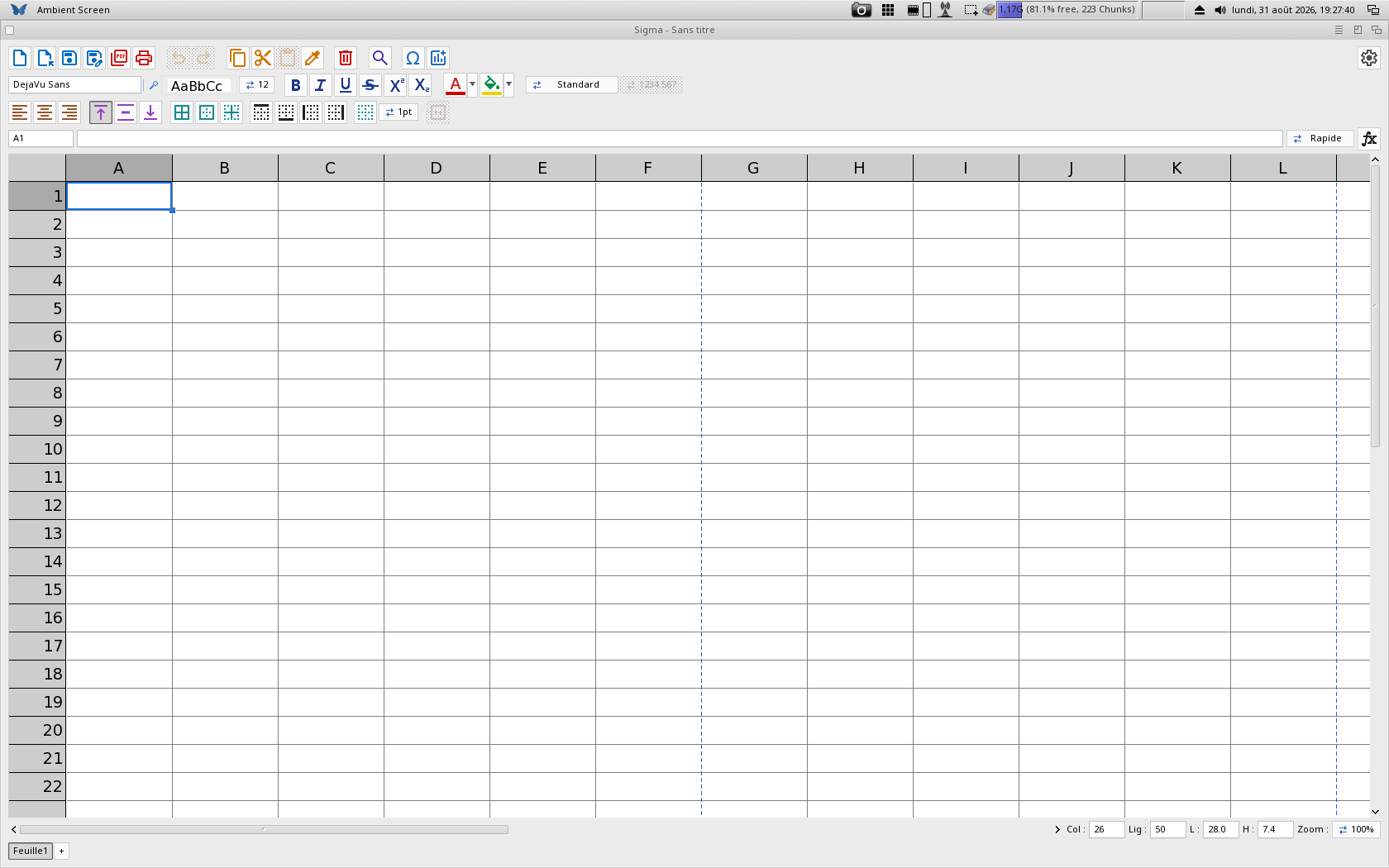
A native spreadsheet for MorphOS built with MUI and TTEngine for TrueType font rendering. Sigma offers live formulas, rich cell formatting and native OpenDocument (.ods) import/export, with full UTF-8 Unicode support throughout. A sparse cell model means a grid of millions of logical cells stays light on memory — RAM tracks only the cells you actually use. Sigma now holds up to 256 sheets in one document, draws charts (bars, lines, pies) live from the cells, freezes panes, imports and exports XLSX, and lets you write your own number format codes as in Excel — on top of a large formula engine with function names you can type in your language, merged cells, Excel-like borders, a fill handle, range sort, driverless IPP / AirPrint printing with live preview, PDF export with embedded fonts and autosave with crash recovery. Big documents open: a 9.5 MB workbook that used to ask for 232 MB of memory now asks for 17.6.

Demo version available — The free demo lets you try every feature; saving (ODS or CSV) requires the registered version. Register (29.90 €) for Sigma and all future updates. Or take the whole suite — Papio-Office, all six programs — for 89.90 €. Contact me to receive your registered version.
  • Grid up to 16384 rows × 256 columns with a sparse cell model — memory tracks only the cells you actually use
  • Live formula engine with 100+ functions: A1 references, A1:B2 ranges, absolute references ($A$1), math & statistics (SUM, AVERAGE, MEDIAN, STDEV…), logic (IF, IFERROR), lookups (VLOOKUP, HLOOKUP, INDEX, MATCH), conditional sums (SUMIF, COUNTIF), text and date functions — names can also be typed in French — with #CYCLE / #REF! / #DIV/0! detection
  • Point mode: while typing a formula, click or drag cells to insert their reference, or drag a handle to resize a range
  • Inline editing with in-cell text selection, undo/redo, cut/copy/paste that keeps cell formatting, a fill handle, range sort, insert/delete rows and columns (references auto-adjust) and find/replace — including sorting by the column you right-click, with the whole rows following and the header row left in place
  • Rich formatting: bold, italic, underline, strikethrough, super/subscript, text and cell colours, per-cell font and size, alignment, borders and format painter
  • Number formats in two lists — the family (General, 0.00, integer, thousands, percent, currency, scientific, date, time, text) and its variants, each shown as a sample of the result — plus custom format codes as in Excel, and a Unicode symbol band for special characters
  • Native OpenDocument (.ods) import and export — a faithful round-trip of data, live formulas, fonts, colours, borders, number formats and column/row sizes, interoperable with LibreOffice and Excel
  • CSV (RFC-4180, UTF-8) import/export with automatic separator detection (comma, semicolon or tab), drag & drop to open, TrueType rendering via TTEngine and EDID-based DPI for true 1:1 physical sizing
  • PDF export with embedded fonts (A4, portrait/landscape, adjustable margins) and driverless network printing via IPP / AirPrint — printer discovery, page range, N-up, scale-to-fit and a live preview — plus autosave with crash recovery — landscape now lays the table out on a wide page, and the paper size picked in the Print window is the one the table is laid out for
  • Merge and split cells, Excel/Calc-like single-line cell borders with thickness presets, and a Go-to-cell name box
  • XLSX (Excel) import and export — every sheet with its styles, colours, borders, number formats, merged cells and charts — and a fully localized interface in 15 languages with function names you can type in your language — the export keeps the document's fonts, sizes and cell alignment, and the import reads the charts back
  • Charts (bars, lines, pies) drawn live from the cells: they float over the grid, follow their data, come out in the PDF export and on the printer, and are saved in the .ods so LibreOffice reads them back — the title, the labels and the legend each take their own font and size
  • Up to 256 sheets in one document with a scrolling tab bar (double-click to rename, right-click to insert or delete), formulas that reference another sheet, and frozen panes that keep the rows above and the columns left of the active cell on screen
  • TurboCalc (.tcd) import — the Amiga spreadsheet's text, numbers, dates and formulas, with bold/italic, alignment, borders, colours and column widths
Diapos - presentation software
Office

Diapos #

Version 2.6

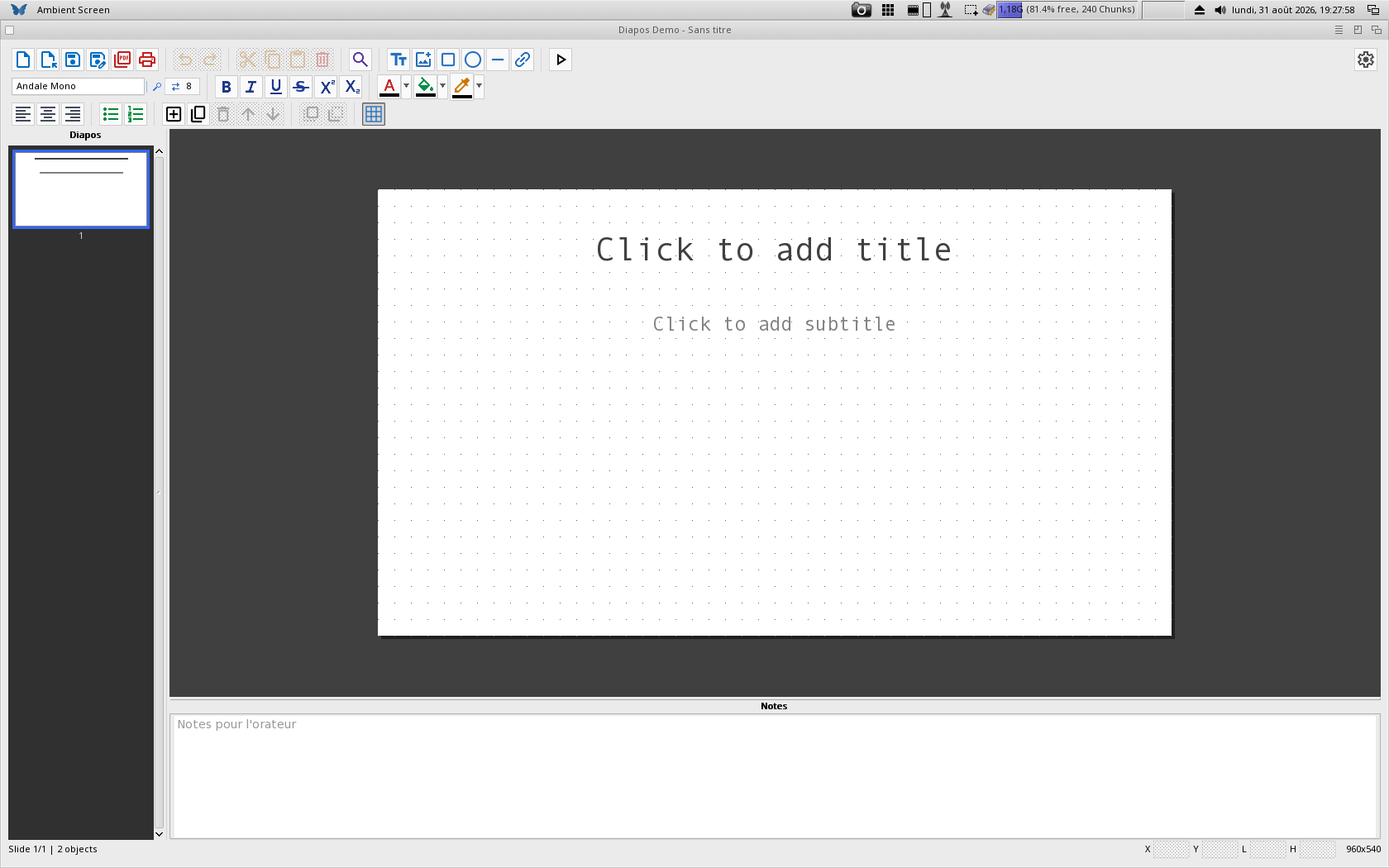
A native presentation program for MorphOS, built with MUI and TTEngine for TrueType rendering. Diapos edits slides on a WYSIWYG canvas, plays them full screen with transitions, and reads and writes PowerPoint (.pptx) natively — text and its formatting, pictures, shapes, tables, hyperlinks, lists, slide numbers, transitions, stacking order, the angle of a turned shape and the speaker notes all travel both ways. Up to 256 slides of 64 objects each, in 16:9. Formatting goes down to the character, rectangles and lines turn as vector work and stay editable at any angle, and a range of cells copied from Sigma pastes as a real table with the fonts, styles and alignments of its cells.Insert > Table asks for the number of rows and columns, a cell holds its text at the top, the middle or the bottom, and a right-click gives each object its own menu.

Demo version available — opening, editing and importing are free; saving (.pptx), PDF export and printing require the registered version. Register (29.90 €) for Diapos and all future updates. Or take the whole suite — Papio-Office, all six programs — for 89.90 €. Contact me to receive your registered version.
  • Up to 256 slides of 64 objects in 16:9, a thumbnail panel on the left, a background colour or picture per slide, and slide numbering drawn on the canvas, in the show and in the PDF
  • PowerPoint (.pptx) read and written natively: formatting, pictures, shapes, tables, hyperlinks, lists, transitions, stacking order, turned shapes, speaker notes and document properties travel both ways
  • Text boxes, pictures, rectangles, ellipses, lines and tables; rectangles and lines turn about their centre as vector work and stay editable at any angle
  • Formatting per character — bold, italic, underline, strikethrough, superscript, subscript, size, colour and typeface — with any TrueType family installed, and bulleted or numbered lists over eight levels of indent
  • Speaker notes in a pane under the canvas, written into the .pptx as real notes: PowerPoint, LibreOffice and Keynote show them where they belong, and Diapos reads back the notes they write
  • Full-screen slideshow with transitions (fade, or slide in from any side), hyperlinks clickable during the show, PDF export one page per slide and driverless IPP printing
  • A range of cells copied from Sigma pastes as a real table, with the fonts, styles and alignments of the cells; autosave with recovery, 64 levels of undo and a 15-language interface
NoPaper - paperless document manager
Office

NoPaper #

Version 1.7

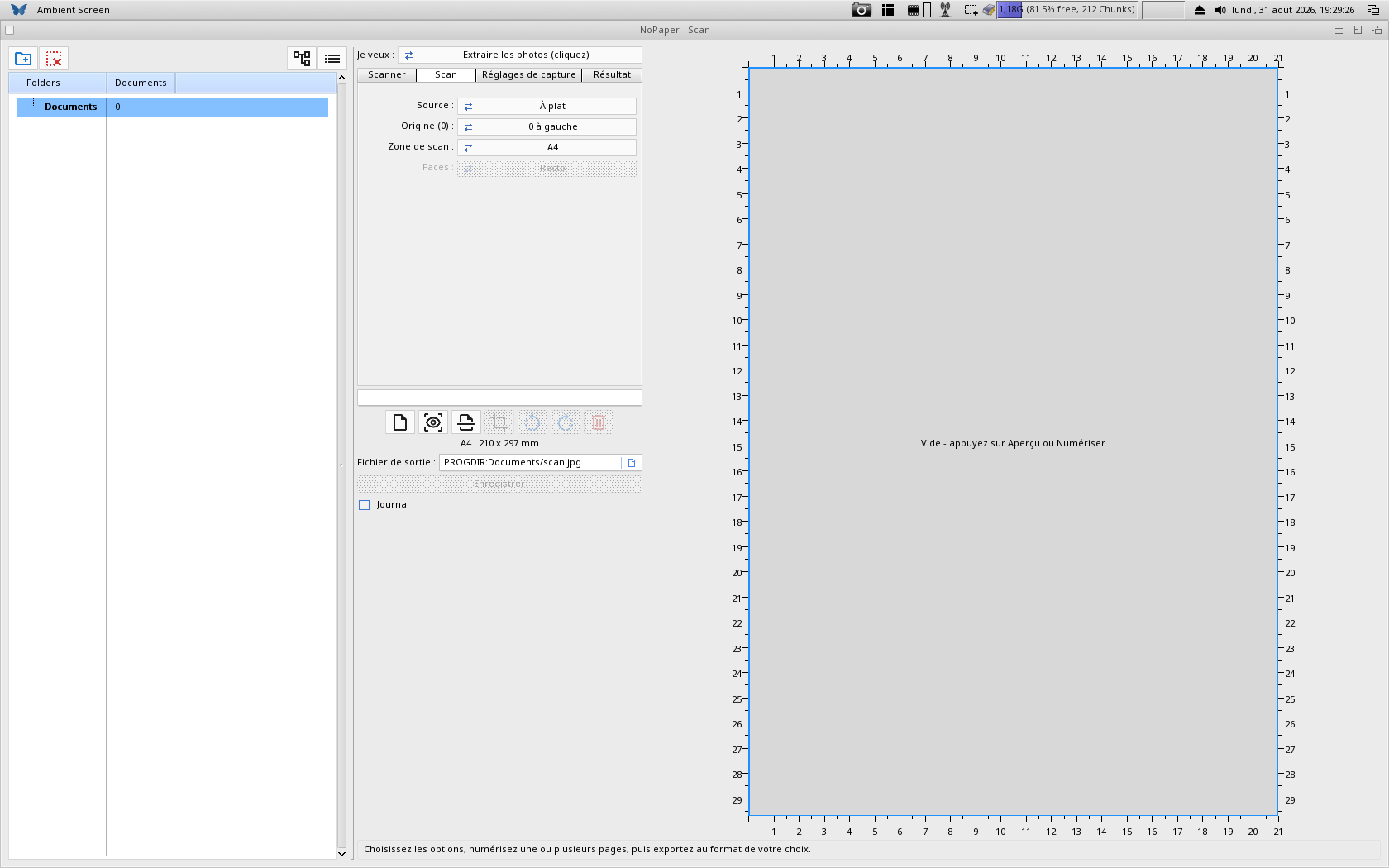
A scanner and paperless document manager for MorphOS: two things in one window. A library — a tree of drawers on the left, the documents of the selected drawer in the middle, the page itself on the right — and a scanner page that takes their place when you press the scan button. The drawer tree never moves, and that is the whole point: you scan into the drawer you are looking at, so the page is filed the moment it is saved. NoPaper shows PDF and PostScript through Ghostscript and every usual image format on its own, reads the text off a scanned page through Tesseract, and writes a PDF you can search.A PDF also opens as a column of its pages: move them, remove them, drag them into another order, drop a second PDF to add its pages, and Save writes the reworked document beside the original, which is left untouched.

Demo version available — the whole library works, and so does the scan preview: find your scanner, scan a page and look at it. Only saving a scan is reserved for registered users. Register (19.90 €) for NoPaper and all future updates. Or take the whole suite — Papio-Office, all six programs — for 89.90 €. Contact me to receive your registered version.
  • A tree of drawers on the left, the documents in the middle, the page on the right; add any drawer or volume, and removing it from the tree deletes nothing on disk
  • PDF, PS and EPS shown through Ghostscript; JPEG, PNG, GIF, BMP, TIFF and IFF/ILBM through Reggae, with JPEG orientation honoured so an upright photo shows upright
  • Leaf through a multi-page PDF, rotate a page, view it fullscreen on a double-click, and drag a document onto a drawer to file it there
  • Driverless eSCL / AirScan scanning — no driver to install: flatbed or document feeder, one side or both, with a preview and a crop you draw on it
  • Six tasks in a single cycle: extract the photos, document as image, document as PDF, photo as PDF, searchable PDF, or extract the text
  • OCR through Tesseract — pick the language and the page layout; the searchable PDF is the scan plus an invisible text layer built from the word boxes
  • The scanned page files itself: the drawer is re-read, and the new document is selected and shown. Interface in 15 languages
IPP-PrintScan - driverless printing IPP-PrintScan - driverless scanning
Office

IPP-PrintScan #

Version 2.0

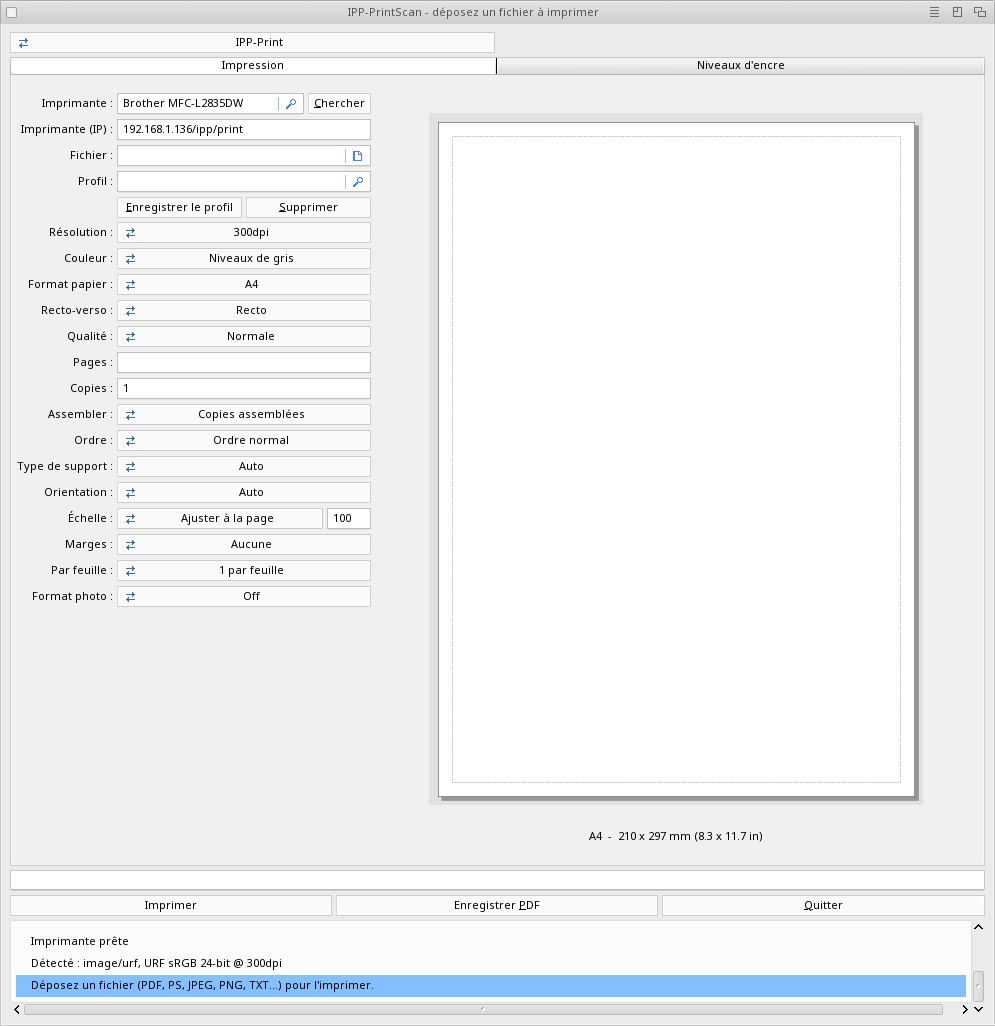
IPP-PrintScan puts driverless printing and scanning in one program. A cycle at the top of the window switches between them: printing on one side, scanning on the other — the window stays, only the page changes. It sends any file — PDF, PostScript, images or plain text — to an IPP / AirPrint printer, and captures pages from an eSCL / AirScan scanner, with OCR searchable-PDF output and multi-page scanning. Because the two halves now live together, one search finds the printer and the scanner at once, and a scanned page can go straight to the printer. Devices are discovered via mDNS / Bonjour, with no driver and no configuration. IPP-PrintScan replaces IPP-Print and IPP-Scan, which it contains, and uses the same registration. A batch fed through the ADF is kept and saved as one multi-page PDF, and the profile you were using comes back the next time the program opens.

Demo versions available — One purchase registers both apps. Register IPP-PrintScan (19.90 €) to unlock printing, PDF saving and scan-to-file, plus free updates. Or take the whole suite — Papio-Office, all six programs — for 89.90 €. Contact me to receive your registered version.
  • Drag & drop printing of PDF, PostScript, any image (JPEG, PNG, GIF, BMP, TIFF, IFF) and plain text files
  • Automatic printer and scanner discovery via mDNS / Bonjour (AirPrint / AirScan), with manual IP entry as fallback
  • Driverless IPP printing with Apple Raster (URF), and encrypted IPPS / TLS when the printer requires it
  • Automatic capability detection: paper size, resolution, colour mode, duplex and borderless — nothing to set by hand
  • WYSIWYG print preview, scale to fit / fill, several pages per sheet (N-up) with cut guides and photo sizes
  • Driverless eSCL / AirScan scanning from the flatbed or document feeder (ADF), with two-sided (duplex) support
  • Output as JPEG, PDF, searchable PDF (image + invisible OCR text layer) or plain text — OCR powered by a bundled Tesseract engine
  • Live scan preview with a centimetre ruler and a frame showing the captured area on the glass
  • Multi-page scanning from the feeder or via Add-page batches, reviewed page by page and saved as a single PDF
  • Post-scan crop and one-click re-save in another format without scanning again; options grouped in Scan / Image / Output tabs
  • Ink / toner level gauges, persistent device selection, 15-language interface and a single log file per app
  • Goal-based “I want…” workflow: extract the photos, scan as JPEG / PDF / searchable PDF, or extract the text — the choice presets every other setting
  • Multi-image scanning: put several photos on the glass, scan the page once, then click a photo to auto-frame it or drag a box — and save one JPEG per image
  • One window, two pages: a cycle at the top switches between printing and scanning — nothing closes, nothing reopens, and each half keeps its own interface, preferences and translations
  • Copy: the scanned pages go straight to the printing page, with no temporary file to find again — and you still see the preview, the paper and the settings before anything is printed
  • One search finds both: a multifunction announces itself twice on the network, and a single four-second listen fills the printer list and the scanner list at once
Cardex - card file
Office

Cardex #

Version 1.5

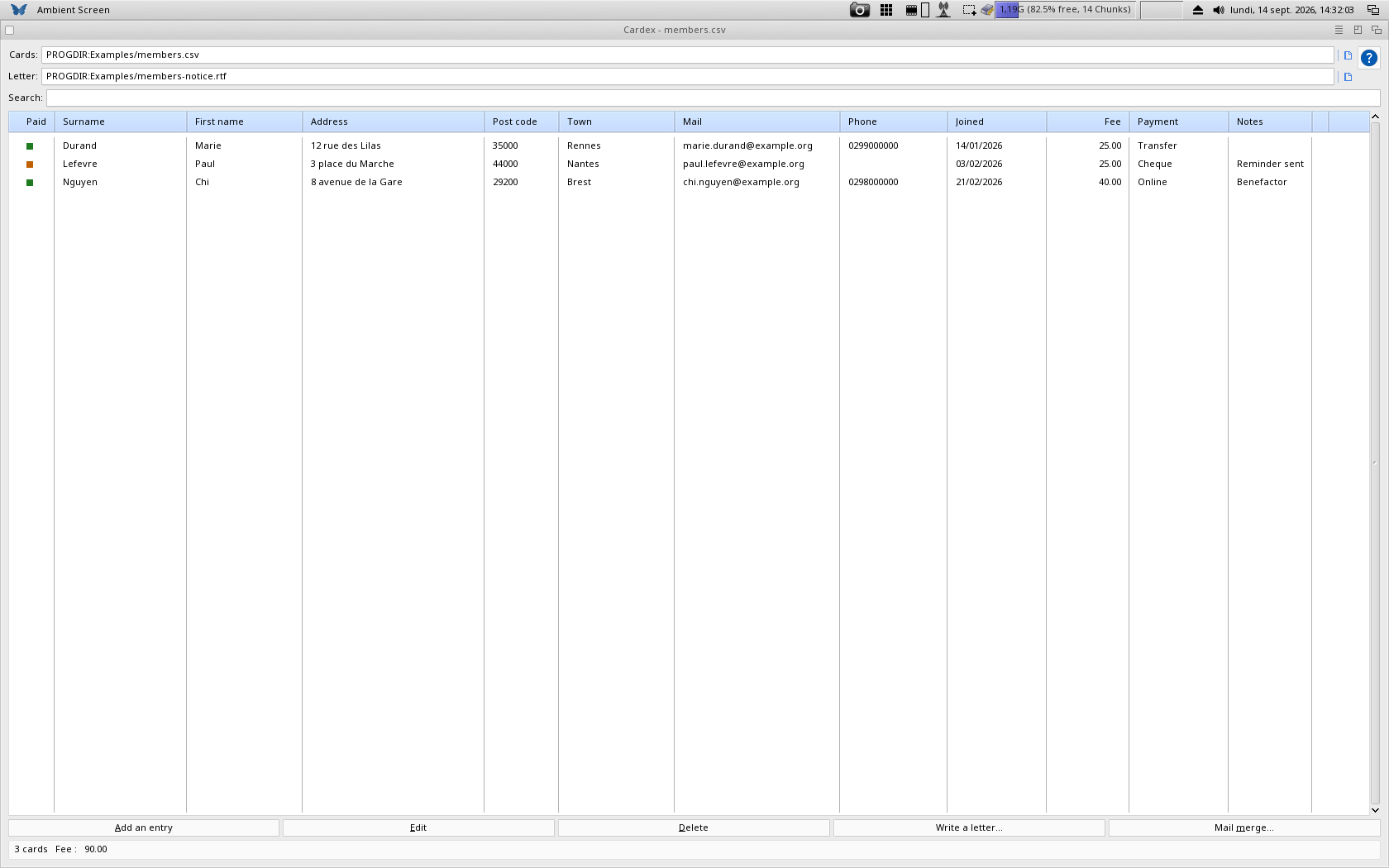
A card file you define yourself. A layout file says which fields exist, of what type and how wide; the grid and the entry form are built from it, so the same program keeps a membership list, an inventory or a collection. A search box above the table narrows the cards as you type, on every field at once. And the cards go out: one letter per card written in Stylos, the list or sheets of address labels printed, or the whole thing exported as a PDF.

Demo version available — everything can be tried: opening a layout, browsing, sorting, filtering, editing cards and the mail merge. Only saving the card file needs a registration (19.90 €), future updates included. Cardex is free for those already registered for the whole suite — Papio-Office, all six programs, 89.90 €. Contact me to receive your registered version.
  • Seven kinds of field — text, note, number, money, date, tick box and a list of choices; money is right aligned and totalled at the foot of the window, over the cards shown
  • A layout editor: fields are added, removed, moved, renamed and retyped in a window, and on a bare Cardex it builds a whole card file from nothing
  • A search box above the table: type, and only the cards holding that text stay — any field, as you type
  • Mail merge: pick a model letter and Cardex writes one letter per card in Stylos; Write a letter opens Stylos with the field names listed beside the page
  • Printing: the list as it is shown, or sheets of address labels; Export PDF keeps the file. What is selected wins over what is shown, for printing as for the merge
  • Three layouts come with it — a complete membership example, an address book and an inventory; undo and redo on Amiga+Z and Amiga+Y; interface in 15 languages